 Overview
This document lists out the elements that can be configured by the Site Producers or Technical team members (hereinafter Admin).
This list is mainly based on the Pilot features, and more items may get added as we conduct further discovery.
 Dashboard Configuration
Card Visibility
Admin can configure which cards are visible to each of the roles on the Dashboard.
Default
All cards including the various statistics cards would be visible by default to all users.
Card Layout
Admin can configure the default layout of the cards appearing. However, each user can configure their own order within the article interface, which would be preserved for each user when the user accesses the same content type.
Default
Follow the order of the cards in the Pilot:
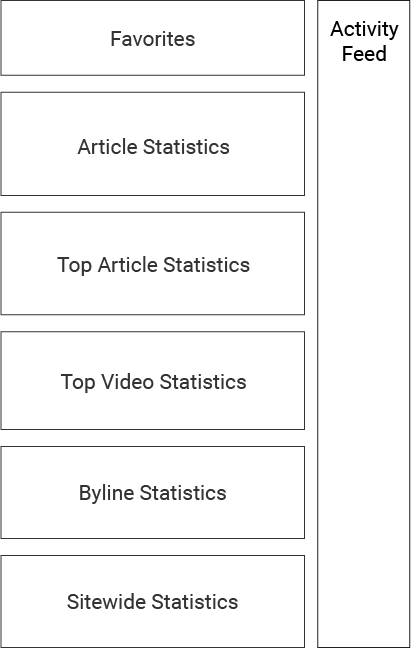
- Favorites
- Article Statistics
- Top Article Statistics
- Top Video Statistics
- Byline Statistics
- Sitewide Statistics
 Article Configuration
Card Visibility
Admin can configure which cards are visible to each of the roles in article creation.
Default
The default value of the configuration would be as the following, but note that all cards will be visible to everyone before Phase 3 is completed.
| Cards | Body | General Info | Social Media | Media | SEO & Promo | Association | Team and Project | Configuration |
|---|---|---|---|---|---|---|---|---|
| Hot Seat | ||||||||
| Writer | ||||||||
| Editor | ||||||||
| Copy Editor | ||||||||
| Copy Editor | ||||||||
| Photo Desk | ||||||||
| Video Producer/Editor | ||||||||
| Social Producer | ||||||||
| Site Producer |
Card Layout
Admin can configure the default layout of the cards appearing. However, each user can configure their own order within the article interface, which would be preserved for each user when the user accesses the same content type.
Default
Follow the order of the cards in the Pilot:
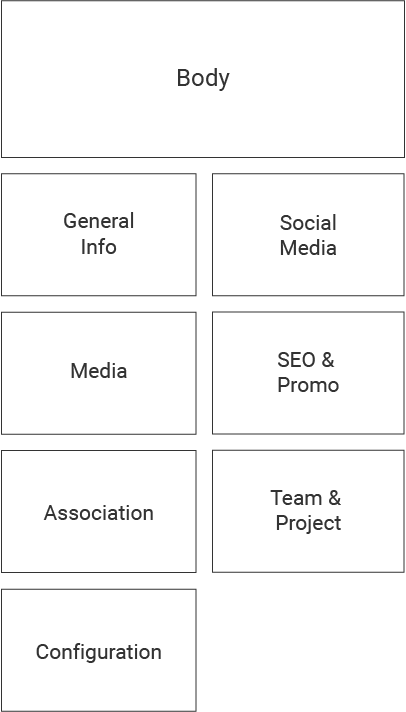
- Body (large)
- General Info (small)
- Social Media (small)
- Media (small)
- SEO & Promo (small)
- Association (small)
- Team & Project (small)
- Configuration (small)
Permission to Lock
Admin can configure which users and/or roles can lock and unlock the articles.
Default
All Hot Seats and Editors have the permission to lock and unlock.
Permission to Display as Homepage Banner and Send Mobile Notification
Admin can configure which additional users would have the permission to display articles on homepage banner and send mobile notifications.
Default
All Hot Seats have the permission to display as homepage banner and send mobile notification.
 Image Management
Permission to License Photos
Admin can configure which additional users would have the permission to license photos form 3rd party sources.
Default
All Photo Desks have the permission to license photos.
Permission to See All Photos
Admin can configure which additional users would have the permission to see all the photos in the system, including the photos that are one-time use or have been used in the past 48 hours.
Default
All Photo desks have the permission to see all the photos. Other users would only see the photos that are available for use: non-one-time use and last used before 48 hours ago
Rules for Available Photos
Admin can configure which photos are deemed available for use and browse to regular users. The criteria include, but not limited to, License Type and number of hours of the last use.
Default
Photos with the any license condition but one-time use and haven’t been used in the last 24 hours are deemed available and visible to the regular users in Media Library.
Ability to Add or Remove License Types
Admin should be able to add or remove the license types of the photos, and configure the rules/criteria of each license type.
Default
More discovery is needed before finalizing the list of the license types, but the initial list is as follows:
- One-time: Photos from AP
- Premium: Some photos from Getty Images that need to be licensed per use
- Subscription: Rest of the photos from Getty Images that can be used many times with a single license
- CNBC: CNBC-produced images that can be freely used
 Other Configuration
Other configurations
- Give temporary admin permission to specific users
- User account management: Add, Modify, Delete, etc.
- 3rd party information: IDs, API keys, etc.